

Sevocity EHR · Standalone EHR/EMR
Custom EHR Software Built for Independent Practices
Sevocity is a customizable EHR system that adapts to your specialty, your workflows, and every provider in your practice. ONC certified and MIPS compliant without the complexity built for hospital systems.
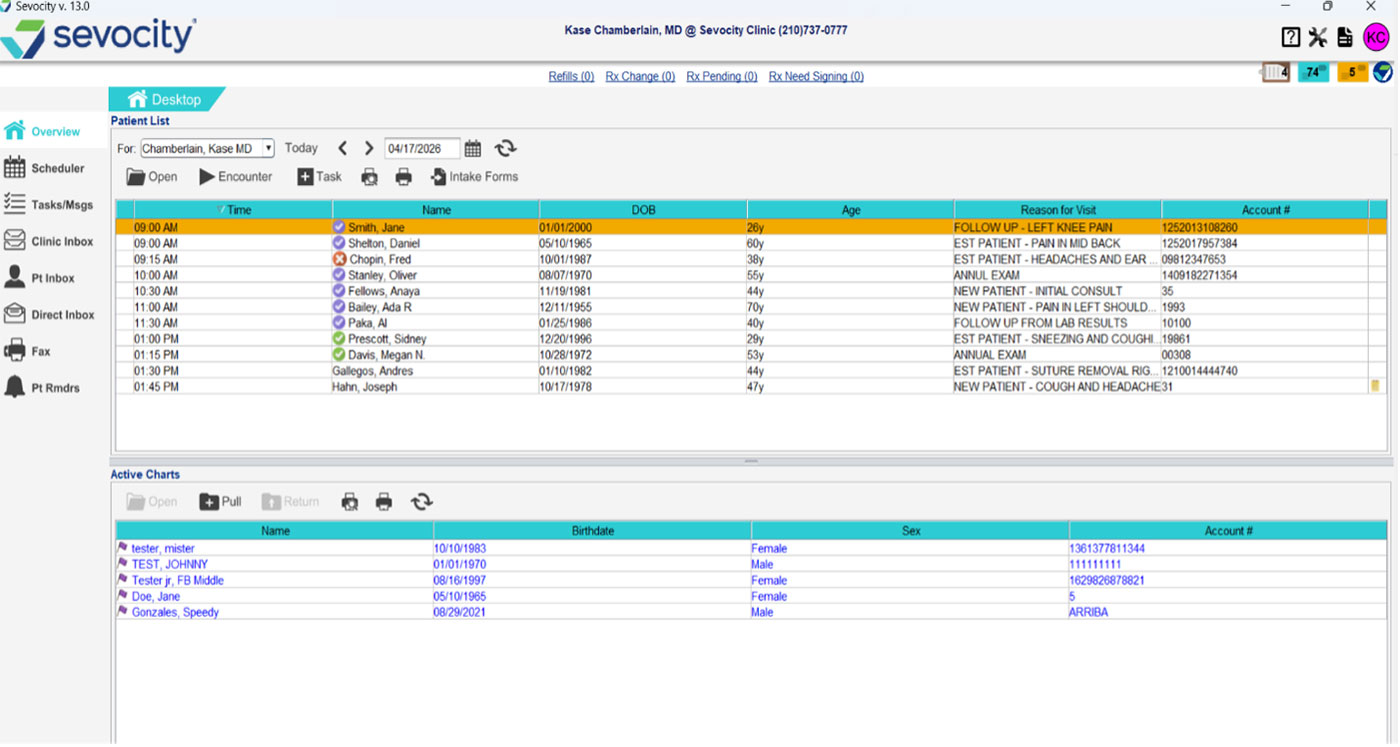
Sevocity EHR
What’s in the Sevocity Custom EHR System
The Sevocity EHR includes a strong core clinical toolset. Additional modules can be added as your practice needs them. Every practice starts with the essentials and nothing you don’t use.
Core Clinical Tools
- Customizable Flowsheets
- Direct Messaging
- E&M Coding + ICD-10 Support
- ePrescribing + EPCS
- HL7 Lab & Imaging
- Mobile Prescribing
- ONC Certified · MIPS
- Patient Portal
- Practice Management Integration
- Provider-Level Preferences
- Quest Lab Interface
- Referral Interfaces
- Scheduling Interfaces
- Specialty Templates
Available Add-On Modules
- AI Ambient Documentation
- eFax Integration
- PDMP Integration
- Point Click Care
- Telehealth Video Visits
Need billing and scheduling too? Sevocity Premier is the full EHR and practice management system in one. Learn about Sevocity Premier →
Provider-Level Customization
Your EHR. Your Workflows. Your Terminology. Each Provider’s Way.
Most EHR software gives you one setup and expects everyone to use it. Sevocity is built differently. EHR customization runs three levels deep, so independent practices can let every provider work the way they work without sacrificing clean data.
What’s in Your Custom EHR
Start with your specialty’s clinical foundation and add only the modules your practice actually uses. Different providers in the same practice can have different toolsets configured for their workflows. Custom EHR solutions shouldn’t mean paying for features you don’t need or working around tools that don’t apply to your specialty.
How You Document
Every specialty starts with purpose-built templates that reflect how that discipline actually charts. From there, each provider can modify their own note structures, flowsheets, and order sets without affecting anyone else’s configuration. One provider making changes to their templates doesn’t have to touch another provider’s setup.
The Language You Use
Even the terminology inside the EHR can be configured to match how your specialty and your providers actually talk. Diagnoses map to your preferred terms. Workflows use your practice’s language. The data stays clean and codified on the back end, but the interface speaks the way your providers think.
I like the ability to create personalized templates and flow sheets created by the excellent customer service support team.
Charlotte C., LCSW — Mental Health Practice · Capterra
AI Ambient Documentation
Spend Less Time Charting. More Time Practicing.
Sevocity’s AI ambient documentation module (powered by award-winning Suki) listens during the visit, drafts the note in your records, and surfaces it for one-click review. Your providers stop typing between patients, and the note reflects your specialty’s language, not a generic form.
- AI-generated notes built around your custom templates
- Reduce charting time by up to 41%
- Provider reviews and approves before saving
- Works within your existing EHR workflow
- Available as an add-on module
ONC Certified · MIPS Compliant
MIPS Reporting Built Into Your Custom EHR, Not Bolted On
For MIPS-eligible practices, the reporting burden falls entirely on you. Sevocity EHR is ONC-ACB certified under the 21st Century Cures Act with MIPS quality reporting built directly into the clinical documentation workflow.
- Track quality measures as you chart
- Report directly from the EHR
- No separate MIPS software needed
- Promoting Interoperability (PI) support
- Improvement Activities documentation
- BAA and HIPAA-compliant infrastructure
Independent practices that rely on hospital EHR access can lose MIPS tracking visibility when a patient relationship ends. Sevocity EHR keeps your data and your reporting in your practice. Where it belongs.
Why It Matters for Independent Practices
Hospital-employed clinicians often have MIPS reporting handled at the system level, through APM participation or group-level reporting. For independent practices, the reporting burden, the penalty risk, and the bonus opportunity are yours to manage, and doing it properly requires a certified EHR.
Sevocity EHR has been ONC certified and used by independent practices for MIPS reporting since the program launched. The workflow is part of the chart. Not an afterthought.
Specialty Coverage
Custom EHR Solutions for 40+ Specialties
Every specialty starts with templates and clinical customization built around how that discipline actually documents. Then your team configures from there, down to each provider.
- Cardiology
- Colorectal Surgery
- Cosmetic Dermatology
- Dermatology
- Endocrinology
- Family Medicine
- FQHC
- Gastroenterology
- General Surgery
- Geriatrics & Aging
- Gynecology
- Hand Surgery
- Internal Medicine
- Mental Health
- Multi-Specialty
- Nephrology
- Neuro Surgery
- Neurology
- OB/Gyn
- Occupational Medicine
- Orthopedics
- Otolaryngology
- Pain Management
- Pediatrics
- Physical Medicine
- Physical Therapy
- Plastic Surgery
- Podiatry
- Psychiatry
- Psychology
- Pulmonology
- Rheumatology
- Sleep Disorders
- Sports Medicine
- Substance Abuse
- Surgery
- Urgent Care
- Urogynecology
- Urology
Don’t see your specialty? Contact us. We help any practice type customize Sevocity EHR for their use.
Verified Reviews
What Independent Practices Say
More than 600 verified reviews across Capterra, Software Advice, and SelectHub. Consistently rated 4.4–4.5 stars.
★★★★★
I am very pleased with my choice of Sevocity as my certified EHR. It is the perfect balance of functionality and affordability for my small practice. The customer service has been great and the system has all the capabilities I need for future growth.
★★★★★
I like the ability to create personalized templates and flow sheets created by the excellent customer service support team.
★★★★★
Support has been exceptional every step of the way. Any template question gets resolved same day. The system has worked exactly as described from day one.
Common Questions
Sevocity EHR FAQs
Sevocity EHR includes a complete core clinical toolset: specialty-specific templates, patient portal, ePrescribing with EPCS, E/M coding and ICD-10 support, Quest lab interface, Direct messaging, HL7 interfaces, referral or scheduling interfaces, and MIPS quality reporting. Additional modules — including AI ambient documentation, PDMP integration, and telehealth — are available as add-ons. The demo call is the right time to walk through exactly what your practice needs so you’re not paying for features you won’t use.
Yes. Sevocity EHR is designed to work standalone and connects with major practice management, billing, and scheduling platforms via standard HL7 interfaces. If your current PM is working, you don’t have to replace it. Billing and coding data, orders, patient demographics, and scheduling data can all flow between systems. If you eventually want to consolidate everything, Sevocity Premier adds the full PM and billing module on top of the same EHR.
It means each provider in your practice can have a different EHR configuration — their own note templates, their own flowsheet layouts, their own preferred terminology — without any of those changes affecting other providers in the system. A cardiologist and an internist in the same practice can have completely different charting experiences that look and feel like their own workflow. The underlying data is clean and structured; the interface is theirs. This is different from most EHRs, which give you one system-wide setup that everyone must use.
Yes. Sevocity EHR is ONC-ACB certified under the 21st Century Cures Act. MIPS quality reporting — including Quality, Promoting Interoperability, and Improvement Activities — is built directly into the clinical documentation workflow. You track and submit measures from the same system you chart in. No separate MIPS software, no data exports, no third-party registry required. For independent practices that face MIPS penalties without a certified EHR, this is part of the core product.
Significantly. Every specialty starts with purpose-built templates covering the documentation patterns common to that discipline. Your team can then modify note structures, create custom flowsheets, change field labels to match your preferred terminology, and configure order sets — all at the provider level. The Sevocity implementation team helps with this during setup, and ongoing customization support is included after go-live. There’s no extra charge for configuration work.
Most practices go live in 4-8 weeks. That covers specialty template configuration, interface setup with your existing PM or billing system, staff training, and data migration from your current EHR. Smaller practices and Urgent Care settings often move faster. A dedicated implementation specialist manages the process from contract through go-live — your team attends training, not project meetings.
US-based support is available 24 hours a day, 7 days a week. This covers clinical support for template and workflow questions, technical support for system access, and ongoing customization help as your practice changes. There’s no tiered support model — every Sevocity EHR practice has access to the same team that handled their implementation.
Sevocity includes a full data migration service as part of implementation — it’s not a separate fee. A dedicated migration specialist handles the export from your current EHR, transforms it to Sevocity’s format, and validates it before go-live. Most standard exports (CCD/CCDA, CSV) from major EHR vendors are supported. Patient demographics, clinical history, and problem lists come over with the migration. Your team doesn’t manually re-enter records. Historical data is accessible in Sevocity after go-live, and the migration specialist is available for questions throughout the process.
Yes. The Sevocity patient portal is included in the core EHR — it’s not an add-on purchase. Patients can access visit summaries, view released lab results, complete intake forms before appointments, and communicate with the practice via secure messaging. The portal connects to your Sevocity EHR data in real time, and it meets Promoting Interoperability (PI) requirements for MIPS reporting purposes. No third-party patient engagement platform is required.
Sevocity EHR is priced per provider per month — not per user, not per location, and not based on practice size or revenue. Front desk staff, clinical assistants, and billing users access the system at no additional per-seat charge. The per-provider model makes costs predictable whether you’re a solo practice or a multi-provider group. Add-on modules (AI ambient documentation, PDMP integration, telehealth, etc.) are priced separately based on what your practice needs. Pricing is reviewed during the demo call — there’s no public rate card because module selections and interface requirements vary by practice.
See Your Custom EHR System Configured for Your Specialty
Every demo walks through your specialty’s templates so you see exactly what Sevocity EHR looks like configured for your practice. It’s not a generic script. Not a hospital workflow.
(877) 777-2298 · Or talk to a specialist first