

Sevocity EHR · Supporting Private Medicine
EHR Software for Independent Practices
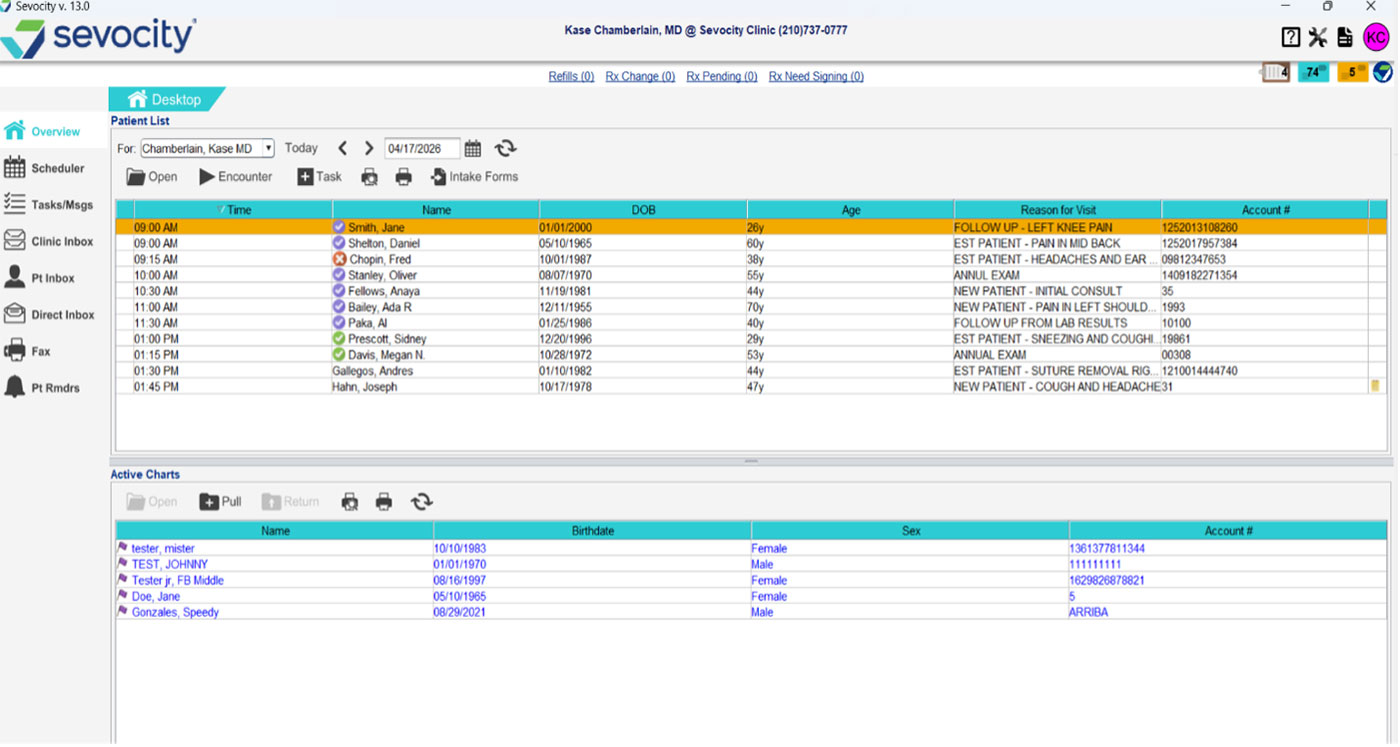
Sevocity is the EHR for providers who are done charting after hours, done working around templates that don’t fit their specialty, and done calling a support line that reads from a script. ONC certified, MIPS compliant, and built to work the way you practice. Not the other way around.
AI Ambient Documentation
Leave the Office When Your Last Patient Does
Sevocity’s AI ambient documentation module (powered by the award-winning Suki) listens during the visit and drafts a structured note in your records, ready for one-click review before the patient leaves the room. Reduce after-hours charting and typing between patients.
- AI-generated notes built into your custom templates
- Reduce charting time by up to 41%
- Provider reviews and approves before saving — you stay in control
- Works within your existing documentation workflow
- Available as an add-on module
Provider-Level Customization
Your EHR. Your Templates. Your Way of Practicing.
Most EHR systems give every provider the same setup and call it done. Sevocity runs three levels deep, so every provider in your practice documents their way without touching anyone else’s workflow.
Templates Built for Your Specialty
Start with specialty-specific clinical content: templates that reflect how your discipline actually charts. Family medicine, OB/Gyn, orthopedics, mental health, urgent care, and 35+ more. Every template is a starting point, not a ceiling.
Every Provider’s Setup Is Their Own
Each provider can have their own templates, flowsheets, and order sets configured to how they practice. One provider changing their note structure doesn’t have to affect anyone else in the practice. Multi-provider groups scale without conflict.
The Language Your Specialty Uses
Terminology, diagnoses, and workflow labels can be configured to match how your specialty and your team actually communicate. The data stays clean and codified on the back end, but the interface speaks the way your providers think.
Wonderful company that makes me feel important and pretty much treats me like a big deal. The infinite ways to modify the exam is a great. I have never seen this simple expandable format in other software.
Darren S., MD · Physician and Practice Owner · Capterra
Running Your Practice
The Business Side Shouldn’t Add to Your Workload
MIPS compliance, switching EHRs, and getting help when something goes wrong; Sevocity handles each one so you can focus on the clinical side.
MIPS Built Into Your Documentation
MIPS quality measures are captured during normal clinical workflow. No separate reporting tool, no bolt-on module, no extra steps at the end of the day. Sevocity is ONC certified and MIPS compliant. Your specialist will walk through exactly how it works for your specialty on the demo call.
Free Migration, Managed by Sevocity
Your patient history, templates, and configurations move with you at no extra cost, managed by Sevocity’s migration team from start to finish. Most practices are live within four to eight weeks of signing. No disruption to billing or patient care during the transition.
24/7 US-Based Support That Picks Up
When something goes wrong at 7am before clinic starts, you reach a real person in the US. Not a ticketing system, not an overseas call center. Sevocity’s support team knows the software. Most issues are resolved on the first call, any day of the year.
40+ Specialties
Built for Your Specialty, Not a Generic Template
Every specialty starts with purpose-built clinical content. If you don’t see yours, contact us. We configure Sevocity for any independent practice type.
- Cardiology
- Colorectal Surgery
- Cosmetic Dermatology
- Dermatology
- Endocrinology
- Family Medicine
- FQHC
- Gastroenterology
- General Surgery
- Geriatrics & Aging
- Gynecology
- Hand Surgery
- Internal Medicine
- Mental Health
- Multi-Specialty
- Nephrology
- Neuro Surgery
- Neurology
- OB/Gyn
- Occupational Medicine
- Orthopedics
- Otolaryngology
- Pain Management
- Pediatrics
- Physical Medicine
- Physical Therapy
- Plastic Surgery
- Podiatry
- Psychiatry
- Psychology
- Pulmonology
- Rheumatology
- Sleep Disorders
- Sports Medicine
- Substance Abuse
- Surgery
- Urgent Care
- Urogynecology
- Urology
Don’t see your specialty? Contact us. We customize Sevocity EHR for any specialty.
Verified Reviews
Providers Stay Because It Works
★★★★★
I have been using Sevocity since 2009. I enjoy the flexibility, I also appreciate that it is user friendly and Sevocity as a company is very attenuative in regards to how they can improve the system.
★★★★★
I can say Sevocity is easily the best of them all. We are a family practice clinic and I would highly recommend Sevocity for any primary care doctor.
★★★★★
Great EHR program! I love that our labs can import right into the chart and the ease of communicating to all members of the staff here. It has been really easy to use and learn when training new staff.
Common Questions
EHR Questions from Providers
Yes. Provider-level customization is one of Sevocity’s core design principles. Each provider can have their own templates, flowsheets, and documentation preferences configured independently. One provider changing their note structure never affects anyone else’s setup. Multi-provider groups scale without conflict.
Sevocity’s AI ambient documentation module, powered by Suki, listens during the visit and drafts a structured note in your custom template, ready for one-click review before the patient leaves the room. Providers report reducing charting time by up to 41%. It is available as an add-on module and works within your existing documentation workflow.
Yes. MIPS quality measures are captured during normal clinical documentation. No separate workflow, no bolt-on reporting tool. Sevocity is ONC certified and MIPS compliant. Your product specialist will walk through exactly how MIPS reporting works for your specialty on the demo call.
Yes. Sevocity EHR connects bidirectionally with most major PM systems via standard HL7 interfaces. No disruption to your billing workflow. If you want a fully integrated EHR and PM in one platform, Sevocity Premier combines both. Your specialist will help you figure out which setup fits your practice on the demo call.
Sevocity’s migration team handles the full transition: data mapping, transfer, and verification — at no extra cost. Your patient history moves with you. Most practices are live within four to eight weeks of signing, with no disruption to billing or patient care during the transition.
24/7/365 US-based phone and chat support. Real humans, no ticketing system, no overseas call center. When something breaks before clinic, you reach someone who knows the software and can fix it on the call. Sevocity’s support team works nights, weekends, and holidays because your practice does not stop for those either.
Hospital-system EHRs are built for the complexity of large health systems. They often require dedicated IT staff, lengthy implementation timelines, and offer minimal customizations to non-hospital practices. Sevocity is built specifically for independent practices: faster to implement, significantly more affordable, and designed so providers can configure their own workflows without an IT department. We have been this way since 2003.
See Our EHR Configured for Your Specialty
Send us your workflow or care plan and we’ll build your custom templates before the demo call. 30 minutes — or 15 for busy providers. No obligation.